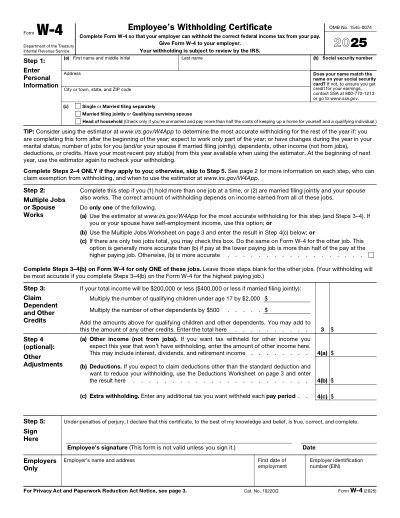
แบบฟอร์มพิมพ์ได้ ปี 2025
 42,014 รีวิวบน

This website is not affiliated with any government agency or tax authority.
อัปเดตล่าสุด: 03/2024 กรุณาตรวจสอบว่าเป็นเวอร์ชันปัจจุบันก่อนใช้งาน
กรอกและส่ง W-4 ได้ง่ายๆ
ทำตามขั้นตอนง่ายๆ เพื่อกรอก เซ็น และส่ง W-4 ออนไลน์
กรอกข้อมูลในแบบฟอร์ม
โปรแกรมแก้ไขที่ใช้งานง่าย ช่วยให้คุณกรอกข้อมูลส่วนตัวและข้อมูลธุรกิจลงใน W-4 ได้อย่างรวดเร็ว
เซ็นแบบฟอร์ม
เพิ่มลายเซ็นอิเล็กทรอนิกส์ลงใน W-4 เพื่อยืนยันว่าเอกสารมาจากคุณโดยตรง
ส่งให้ผู้รับ
ดาวน์โหลดแล้วพิมพ์หรือแชร์ W-4 ที่เซ็นแล้วให้ผู้รับได้ทันที
กรอก W-4 ออนไลน์ได้อย่างไร?
ทำตามขั้นตอนเหล่านี้เพื่อกรอก W-4 ออนไลน์ให้ครบถ้วน
Step 01
Access the W-4 form from the IRS website or your employer.
Step 02
Fill in your personal details accurately.
Step 03
Select your filing status and provide information on dependents.
Step 04
Complete any optional adjustments for additional income or deductions.
Step 05
Sign and date the form before submitting it to your employer.
W-4 ใช้สำหรับอะไร?
ใครต้องกรอก W-4
What is the purpose of the W-4 Form?
When should I submit my W-4 Form?
How can I update my W-4 Form?
พร้อมกรอก W-4 แล้วหรือยัง?
เริ่มกรอกแบบฟอร์มออนไลน์ได้ในไม่กี่นาที รวดเร็ว ปลอดภัย และฟรีทั้งหมด
Our users speak for themselves
คุณภาพที่ได้รับการยืนยันจากผู้ใช้งานจริง
"The folks at Convert2 were just wonderful at helping me resolve a very important issue. I would highly recommend them because there is someone actually paying attention and reaching out to help those who use their service!"
Eugene
Mar 20, 2026
"I wanted to convert a PDF quickly and this tool made it very easy. Everything worked great, and I didn't have to deal with any confusing process."
Bosmat Shelef
Feb 4, 2026
"I needed to convert a PDF quickly and this tool made it easy. Everything worked as expected and I didn't have to deal with any confusing steps."
Elibz
Feb 4, 2026
"Super great and easy to use"
Drew Mascia
Feb 28, 2026
คำถามที่พบบ่อย
Convert2 คืออะไร?
Convert2 ปลอดภัยไหม?
Convert2 เป็นแบบสมัครสมาชิกหรือซื้อขาด?
แก้ไข PDF บน Convert2 ทำอย่างไร?
Convert2 มีฟีเจอร์อะไรบ้าง?
Convert2 รองรับไฟล์ประเภทใดบ้าง?
ถ้าเกิดข้อผิดพลาดควรทำอย่างไร?
จะเลือกเครื่องมือ PDF ออนไลน์ที่เหมาะสมได้อย่างไร?
