2025 可列印範本
This website is not affiliated with any government agency or tax authority.
表單最後更新時間:2024 年 3 月。使用前請確認此為最新版本。
輕鬆完成並提交您的 8944 表單
依照以下簡單步驟,線上填寫、簽署並送出您的 8944 表單。
填寫表單
我們直覺易用的編輯器,讓您快速填入個人或公司資料至 8944 表單範本。
簽署表單
在 8944 表單上加入您的電子簽名,確認文件由您本人親自提交。
傳送給申請方
下載已簽署的 8944,立即列印或分享給申請方。
如何線上填寫 8944?
依照以下步驟,線上完成您的 8944 表單。
Step 01
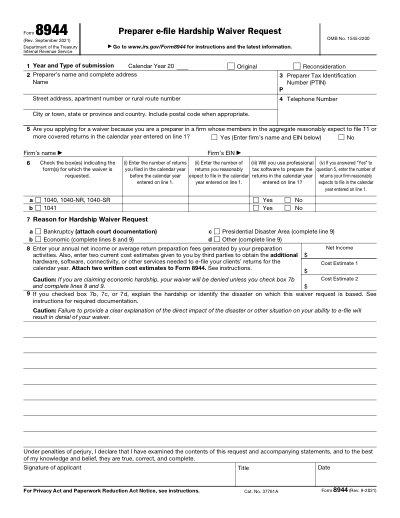
Indicate the year and type of submission on Line 1.
Step 02
Provide the preparer's name and full address on Line 2.
Step 03
Enter the Preparer Tax Identification Number (PTIN) on Line 3.
Step 04
List a contact telephone number on Line 4.
Step 05
Select the reason for the hardship waiver on Line 7.
Step 06
Complete Lines 8 and 9 if claiming economic hardship.
8944 的用途是什麼?
哪些人需要填寫 8944 表單
What is Form 8944?
When is Form 8944 due?
How do I obtain a blank Form 8944?
準備好填寫 8944 了嗎?
幾分鐘內即可線上填寫表單,快速、安全、完全免費。
Our users speak for themselves
經專業人士親身驗證的卓越品質。
"The editing was very easy and easy to download the document."
Fouzia Barwari
Jun 2, 2026
"Quick easy and straightforward thank you"
MRS DAWN ANDREWS
May 23, 2026
"Simple efficient process. It all worked."
Sundeep Salins
Jun 3, 2026
"Editing was easy. I changed some text in the file without affecting the original font or page layout"
Bhagya
May 14, 2026
常見問題 FAQ
Convert2 是什麼?
Convert2 安全嗎?
Convert2 是訂閱制還是買斷制?
如何在 Convert2 上編輯 PDF?
Convert2 提供哪些核心功能?
Convert2 支援哪些檔案格式?
遇到錯誤時該怎麼辦?
如何選擇合適的線上 PDF 工具?
